New Vehicle Tracking System Features at No Extra Cost: The iOS & Android App Guide
Our latest update makes GPS vehicle tracking, fleet monitoring, and personal tracking even more intuitive.
Whether you use a GPS tracker for your car without a subscription, one of our subscription-based tracking devices, or the Lifetime Warranty Model, the optimized interface brings all essential live data directly to your smartphone.
Our Europe-wide real-time 4G tracking is the ideal solution for private car tracking as well as professional commercial use.
Follow this short step-by-step guide to get the most out of your app:
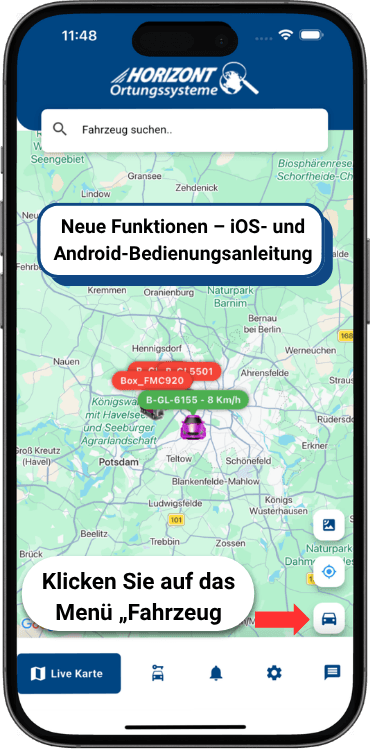
1. Open the GPS Car Tracker App
Open the app on the “Live Map” screen. To manage your car GPS tracker, simply tap the “Vehicle” menu (the car icon) in the bottom-right corner.
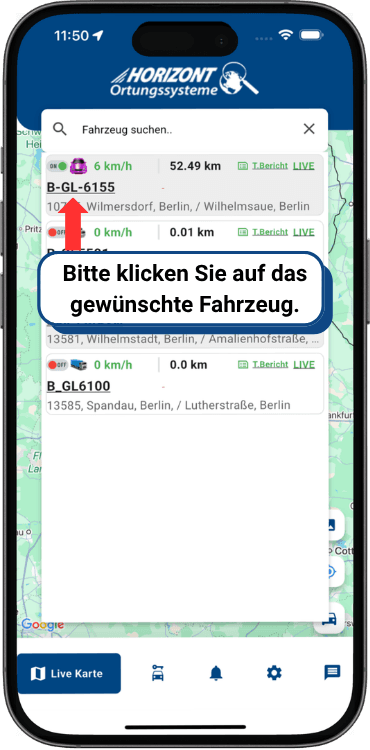
2. Select the Desired Vehicle Tracking System
The overview displays all active vehicles and their current live status, such as speed and location. Tap the desired vehicle to view more detailed information.
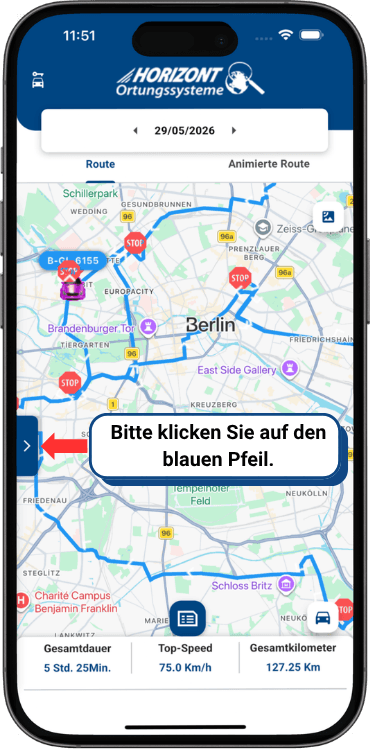
3. Open Additional Features (Cars, Trucks, Construction and Agricultural Machinery & Motorhomes)
After selecting the vehicle, its route view appears on the map. Tap the small blue arrow on the left side of the screen to open the advanced feature menu for detailed analysis.
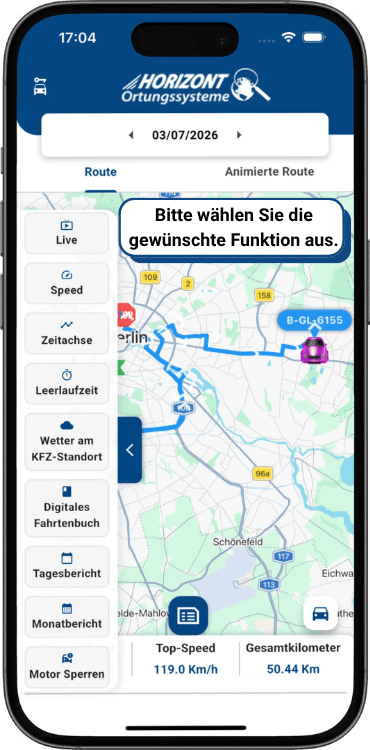
4. Choose a Feature & Stay in Full Control with Updates from Every 2 Seconds
A clear sidebar for professional vehicle monitoring opens. Here you can control the flexible GPS features for trucks and cars with ultra-fast data transmission from every two seconds. Simply select the option you need:
- Live Tracking: View the real-time location of your vehicle or tracked person.
- Speed: Analyze recorded driving speeds precisely.
- Timeline & Routes: Review completed journeys, including an animated route.
- Reports: Quickly access idling, daily, and monthly reports.
- Engine Immobilization: Maximize security remotely at the touch of a button.